MAI Wi-Fi Configuration Fields
This page describes the available configuration options for MAI Wi-Fi in ProGlove Insight.
These settings control how MAI devices connect to Wi-Fi, maintain connectivity, and interact with the Gateway Plus.
Default values are suitable for most use cases. Adjust only if you have specific network or performance requirements.
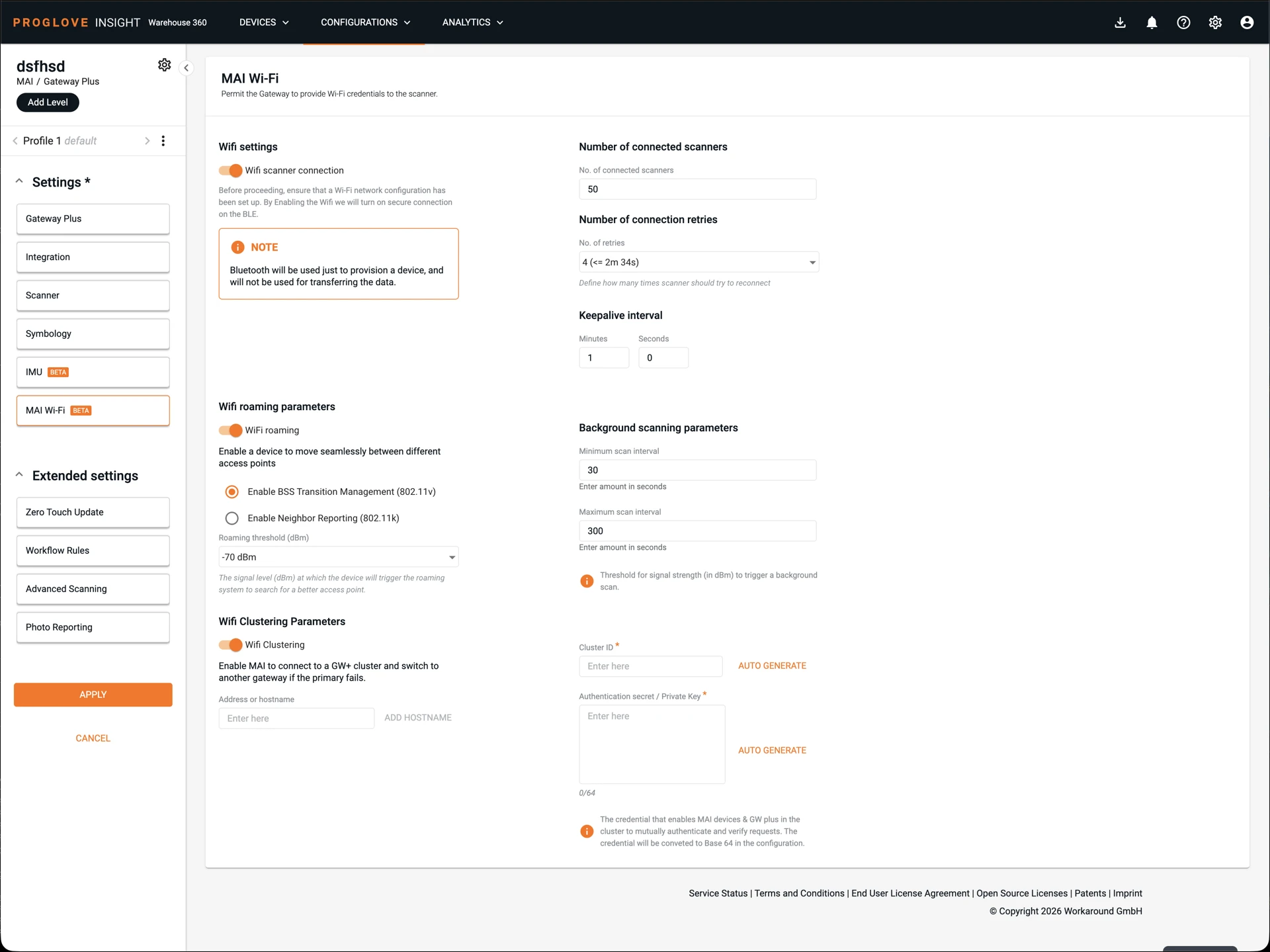
General Settings
Wi-Fi scanner connection
Master switch for enabling MAI Wi-Fi.
Enables Wi-Fi connectivity on the MAI.
.Automatically enables secure Bluetooth (BLE) provisioning, which is required for initial setup.
Number of connected scanners (Gateway Plus)
Defines the maximum number of MAI devices that can connect to a single Gateway Plus.
Applies only to Gateway Plus.
Helps control load and resource usage.
Number of connection retries (MAI)
Specifies how many times the MAI retries connection attempts during setup.
Retries apply independently to each stage:
Wi-Fi network connection.
NTP time synchronization.
MQTT connection.
Each stage retries up to the configured limit before failing.
Keepalive interval (MAI)
Defines how often the MAI sends keepalive (ping) messages to Gateway Plus.
Applies when the device is idle (no active data transmission).
Helps maintain connection stability.
Wi-Fi Roaming
Controls how MAI behaves when moving between access points.
Wi-Fi roaming
Enables roaming between access points.
Enabled by default.
When disabled:
MAI disconnects if signal is lost.
Reconnects only after connection drops.
When enabled:
MAI actively searches for better access points.
Maintains more stable connectivity across coverage areas.
Roaming protocols
BSS Transition Management (802.11v)
Allows the network to suggest better access points.
MAI evaluates suggestions and switches if appropriate.
Neighbor Reporting (802.11k)
Provides a list of nearby access points.
Reduces scanning time by focusing on relevant channels.
Enables faster roaming decisions.
Roaming threshold
Defines the signal strength at which MAI starts searching for a better access point.
Trigger point for roaming behavior.
Includes a built-in buffer relative to background scanning.
Background Scanning
Controls how MAI scans for alternative access points in the background.
Minimum scan interval
Scan interval when signal strength is below the background scanning threshold.
Used when connection quality is poor.
Maximum scan interval
Scan interval when signal strength is above the background scanning threshold.
Used when connection quality is good.
Wi-Fi Clustering
Enables failover and redundancy across multiple Gateway Plus devices.
Wi-Fi clustering
Master switch for enabling clustering.
Allows MAI to connect to multiple Gateway Plus devices.
Improves availability and failover behavior.
Note
Note: Wi-Fi clustering is only supported for MQTT-based communication.
Addresses / hostnames
List of Gateway Plus endpoints forming the cluster.
Can be IP addresses or hostnames.
Hostnames must be resolvable via DNS.
Stored on provisioned MAIs.
Cluster ID
Unique identifier for the cluster.
Must be the same across all Gateway Plus devices in the cluster.
Used for logical grouping.
Authentication secret / private key
Shared credential used for secure communication.
Used to generate TLS credentials.
Must be identical across all cluster members.
Should be treated as sensitive information.
Notes
Default settings are recommended for initial deployment. Advanced settings (roaming, scanning, clustering) should only be adjusted if:
You operate in complex Wi-Fi environments
You require high availability or optimized roaming behavior